
Layers, Functions & Data Encapsulation
A Networking Journey for Cybersecurity Students
Welcome to the world of networking and cybersecurity—where data moves like classified information across digital highways.
At Vivekananda IT Institute, students learn two foundational communication models:
- OSI Model (Open Systems Interconnection)
- TCP/IP Model
These models help professionals understand:
- How devices communicate
- Where cyberattacks occur
- How vulnerabilities are exploited
- How security mechanisms defend networks
📦 1. Internet as a Postal & Security System
Imagine sending a confidential package from Vadodara to another country:
- Write the message
- Translate language
- Encrypt (lock securely)
- Pack into boxes
- Transport via trucks
- Travel through roads/highways
- Deliver to recipient
Similarly, data travels through multiple layers—this is exactly what OSI and TCP/IP models describe.
🧠 2. What is the OSI Model?
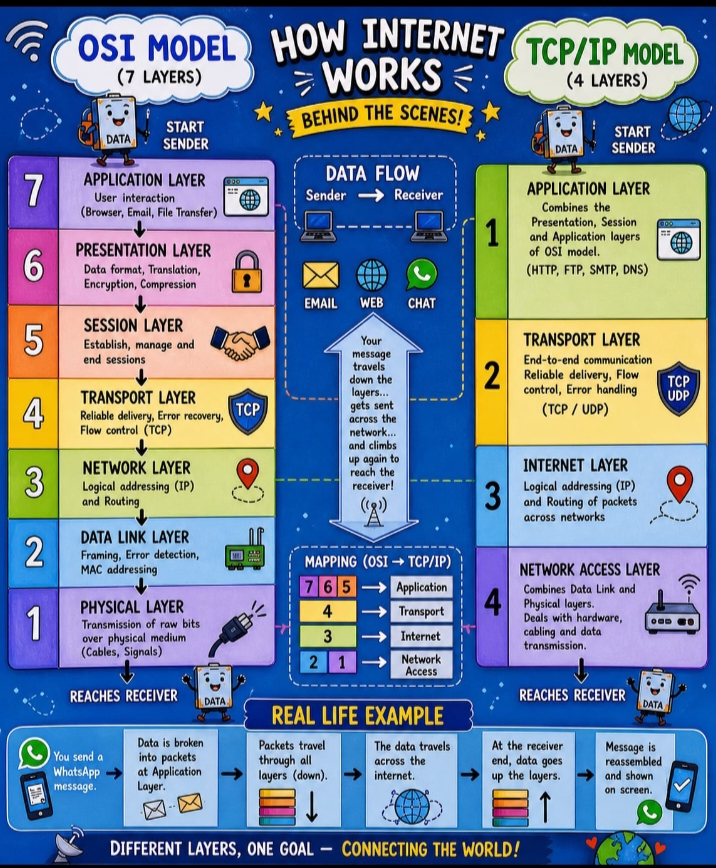
The OSI model is a 7-layer framework used to standardize communication between systems.
It explains:
- Data flow
- Layer responsibilities
- Protocol operations
- Security vulnerabilities
🧩 3. OSI Model Layers (Creative Explanation)
🔹 Layer 7 — Application
“User Interaction Layer”
Where users interact with applications.
Examples:
- Browsers, Email, WhatsApp, Banking apps
Protocols:
- HTTP/HTTPS, FTP, SMTP, DNS
Cyber Threats:
- Phishing
- SQL Injection
- Malware
🔹 Layer 6 — Presentation
“Translation & Encryption Layer”
Functions:
- Data formatting
- Encryption/Decryption
- Compression
Examples:
- SSL/TLS, JPEG, MP3, Unicode
Security Role:
- Protects sensitive data (passwords, banking info)
🔹 Layer 5 — Session
“Conversation Manager”
Functions:
- Start, manage, end sessions
Examples:
- Video calls
- Login sessions
Cyber Threats:
- Session hijacking
- Cookie theft
Security:
- Session timeout
- Multi-factor authentication
🔹 Layer 4 — Transport
“Delivery Assurance Layer”
Functions:
- Reliable delivery
- Error checking
- Flow control
Protocols:
- TCP, UDP
Cyber Threats:
- SYN Flood attacks
- Port scanning
Security:
- Firewalls
- IDS/IPS
🔹 Layer 3 — Network
“Routing & Navigation Layer”
Functions:
- IP addressing
- Routing
Protocols:
- IP, ICMP
Devices:
- Routers
Cyber Threats:
- IP spoofing
- DDoS attacks
🔹 Layer 2 — Data Link
“Local Delivery Layer”
Functions:
- MAC addressing
- Frame delivery
- Error detection
Protocols:
- Ethernet, PPP
Devices:
- Switches
Cyber Threats:
- ARP poisoning
- VLAN hopping
- MAC spoofing
🔹 Layer 1 — Physical
“Hardware Layer”
Functions:
- Signal transmission (electrical, radio, optical)
Devices:
- Cables, hubs, repeaters
Cyber Threats:
- Cable tapping
- Hardware tampering
🧠 Easy Way to Remember OSI Layers
Mnemonic:
👉 All People Seem To Need Data Processing
🌍 4. TCP/IP Model (Real-World Model)
The TCP/IP model is the practical model used on the Internet.
🔹 4 Layers:
| TCP/IP Layer | Corresponding OSI Layers |
|---|---|
| Application | 7, 6, 5 |
| Transport | 4 |
| Internet | 3 |
| Network Access | 2, 1 |
🔹 Application Layer
- HTTP, HTTPS, DNS, FTP
- User-facing services
🔹 Transport Layer
- TCP (reliable)
- UDP (fast, connectionless)
🔹 Internet Layer
- IP addressing
- Routing
🔹 Network Access Layer
- MAC addressing
- Physical transmission
⚖️ 5. OSI vs TCP/IP
| OSI Model | TCP/IP Model |
|---|---|
| 7 Layers | 4 Layers |
| Theoretical | Practical |
| Developed by ISO | Developed by DARPA |
| Detailed | Simpler |
📦 6. What is Data Encapsulation?
Definition:
Encapsulation is the process of adding headers (and trailers) as data moves through layers.
👉 Like packing a gift inside multiple boxes.
📨 7. Encapsulation Process
Step-by-Step:
- Application Layer → Data
Message created
Example: “Hello Cyber Team” - Transport Layer → Segment
Adds:- Port numbers
- Sequence numbers
- Network Layer → Packet
Adds:- Source IP
- Destination IP
- Data Link Layer → Frame
Adds:- MAC addresses
- Physical Layer → Bits
Converts into signals
🔄 8. Decapsulation
At the receiver:
- Each layer removes its header
- Original message is recovered
📊 Encapsulation Flow
Application → Data
Transport → Segment
Network → Packet
Data Link → Frame
Physical → Bits
🛡️ 9. OSI in Cybersecurity
Used to:
- Detect attacks
- Troubleshoot networks
- Analyze malware
- Monitor traffic
⚠️ 10. Layer-wise Attacks
| Layer | Attack |
|---|---|
| Application | Phishing |
| Presentation | SSL attacks |
| Session | Session hijacking |
| Transport | SYN flood |
| Network | IP spoofing |
| Data Link | ARP poisoning |
| Physical | Cable tapping |
🧰 11. Security Tools by Layer
| Tool | Layer |
|---|---|
| Firewall | 3 / 4 |
| WAF | 7 |
| Switch | 2 |
| Router | 3 |
| IDS/IPS | Multiple |
🎯 Final Conclusion
The OSI and TCP/IP models are fundamental to networking and cybersecurity.
Understanding:
- Layers
- Protocols
- Encapsulation
- Threats
…helps students become:
- Network Engineers
- Ethical Hackers
- Cybersecurity Analysts
- SOC Analysts