
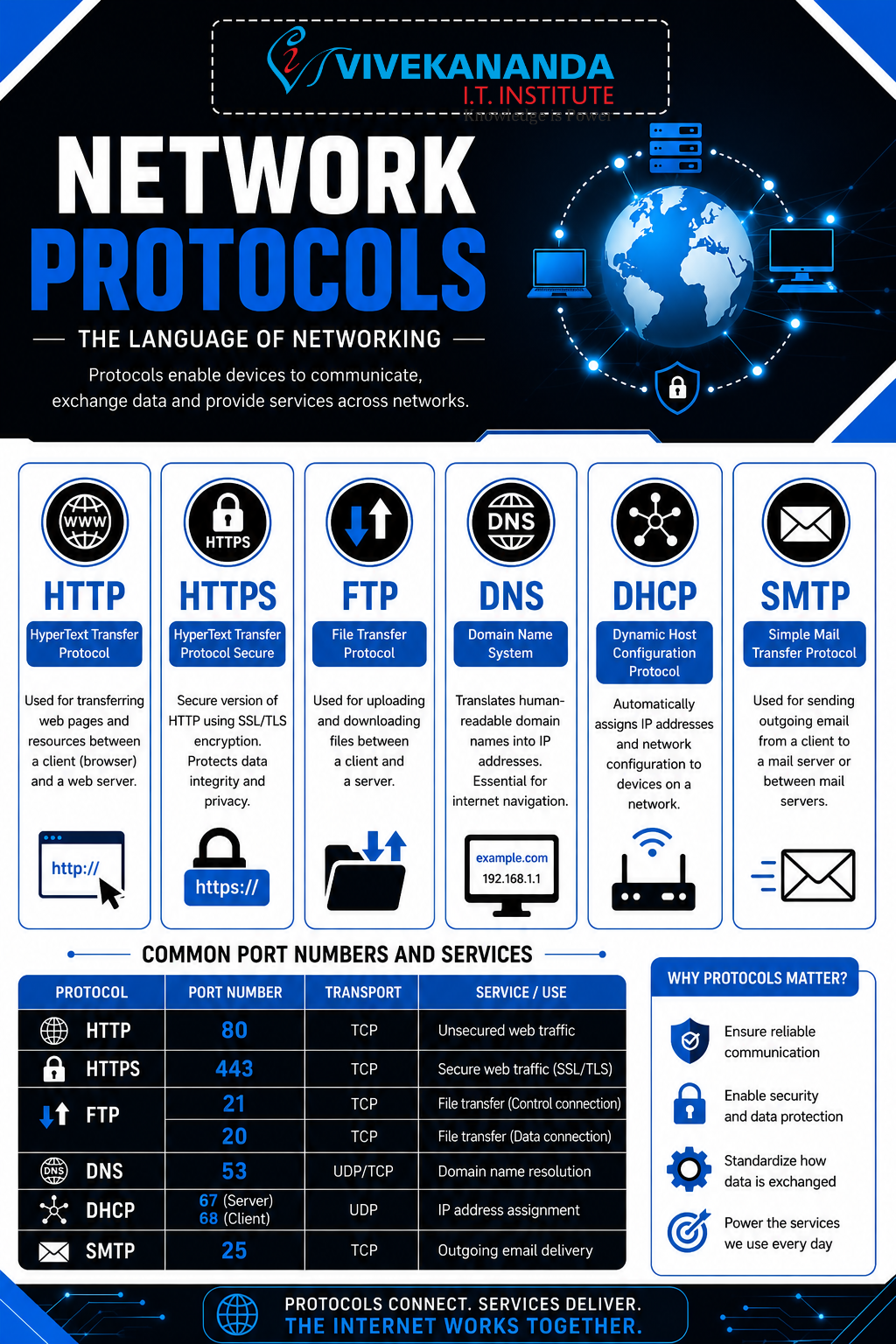
HTTP/HTTPS, FTP, DNS, DHCP, SMTP Port Numbers and Services
Network Protocols – The Digital Language of the Internet
Imagine the internet as a massive smart city where millions of devices communicate every second. Just like humans use different languages and rules to talk, computers use network protocols to exchange information securely and efficiently. In the world of networking and cybersecurity, understanding protocols is one of the most important foundations for every IT professional.
At Vivekananda IT Institute in Vadodara, students learn network protocols not only through theory but also through practical cybersecurity labs, real-time packet analysis, and ethical hacking simulations. Whether you want to become a Network Engineer, Cybersecurity Analyst, or Ethical Hacker, protocols are the backbone of your journey.
What Are Network Protocols?
A network protocol is a set of rules that devices follow to communicate over a network.
These protocols define:
- How data is sent
- How devices identify each other
- How errors are handled
- How security is maintained
Without protocols, the internet would be complete chaos, like people talking different languages without translators.
Why Protocols Matter in Cybersecurity
Protocols are deeply connected with cybersecurity because attackers often target protocol weaknesses.
Understanding protocols helps cybersecurity professionals:
- Detect suspicious traffic
- Identify malware communication
- Prevent unauthorized access
- Secure sensitive information
- Monitor network behavior
At Vivekananda IT Institute, students learn how hackers exploit insecure protocols and how security experts defend networks using advanced monitoring tools.
Common Network Protocols Explained
1. HTTP (HyperText Transfer Protocol)
HTTP is the protocol used for browsing websites.
When you open a website in your browser, HTTP helps transfer web pages from the server to your device.
Example
http://example.com
Features
- Fast communication
- Used for websites
- Transfers text, images, videos, and web content
- Works on Port 80
Security Concern
HTTP data is not encrypted, meaning hackers can intercept information.
Cybersecurity Risks
- Packet sniffing
- Data theft
- Session hijacking
2. HTTPS (HyperText Transfer Protocol Secure)
HTTPS is the secure version of HTTP.
It uses SSL/TLS encryption to protect communication between users and websites.
Example
https://bankwebsite.com
Features
- Encrypted communication
- Secure online banking
- Secure login systems
- Protects passwords and personal data
- Uses Port 443
Importance in Cybersecurity
HTTPS helps prevent:
- Man-in-the-middle attacks
- Data interception
- Credential theft
At Vivekananda IT Institute, students learn SSL certificates, HTTPS inspection, and secure web communication techniques.
Understanding Encryption in HTTPS
HTTPS security relies on encryption.
Simple Formula
Plain Data + Encryption = Secure Communication
This means readable data becomes unreadable to attackers during transmission.
3. FTP (File Transfer Protocol)
FTP is used to transfer files between computers over a network.
Common Uses
- Uploading website files
- Sharing documents
- Server backups
Features
- Transfers large files
- Uses Ports 20 and 21
- Client-server communication
Security Issue
Traditional FTP sends usernames and passwords in plain text.
Secure Alternatives
- SFTP (Secure File Transfer Protocol)
- FTPS (FTP Secure)
Cybersecurity Relevance
Attackers often target unsecured FTP servers to steal data.
Students at Vivekananda IT Institute perform secure file transfer configuration and FTP vulnerability testing in cybersecurity labs.
4. DNS (Domain Name System)
DNS acts like the internet’s phonebook.
Humans remember names like:
google.com
But computers understand IP addresses like:
142.250.183.14
DNS converts domain names into IP addresses.
How DNS Works
Step-by-Step Process
- User types a website name
- DNS server receives the request
- DNS finds the IP address
- Browser connects to the website
Uses Port
- Port 53
Cybersecurity Risks
- DNS spoofing
- DNS poisoning
- Malware communication
Example Attack
Hackers redirect users to fake banking websites using malicious DNS entries.
At Vivekananda IT Institute, students learn DNS security, monitoring, and threat detection techniques.
5. DHCP (Dynamic Host Configuration Protocol)
DHCP automatically assigns IP addresses to devices on a network.
Without DHCP, network administrators would manually assign IP addresses to every device.
Example
When you connect your phone to Wi-Fi, DHCP provides:
- IP address
- Gateway
- DNS server
- Subnet mask
Uses Ports
- Port 67 (Server)
- Port 68 (Client)
Benefits
- Automatic configuration
- Reduces manual errors
- Simplifies network management
Cybersecurity Threats
- Rogue DHCP servers
- IP conflicts
- Network interception attacks
Students at Vivekananda IT Institute learn DHCP monitoring and secure network administration practices.
6. SMTP (Simple Mail Transfer Protocol)
SMTP is responsible for sending emails.
Whenever you send an email, SMTP transfers it from your device to the mail server.
Uses
- Sending emails
- Mail server communication
Uses Ports
- Port 25
- Port 587 (Secure Submission)
Cybersecurity Concerns
- Email spoofing
- Spam attacks
- Phishing emails
Protection Methods
- SPF
- DKIM
- DMARC
At Vivekananda IT Institute, students learn email security, phishing analysis, and secure mail server concepts.
What Are Port Numbers?
Port numbers are virtual communication endpoints used by protocols.
Think of an IP address as a building address and the port number as a room number inside that building.
Common Port Numbers and Services
| Protocol | Port Number | Service |
|---|---|---|
| HTTP | 80 | Web browsing |
| HTTPS | 443 | Secure web browsing |
| FTP | 20/21 | File transfer |
| DNS | 53 | Domain name resolution |
| DHCP | 67/68 | Automatic IP assignment |
| SMTP | 25/587 | Email sending |
| SSH | 22 | Secure remote login |
| Telnet | 23 | Remote access |
| POP3 | 110 | Email retrieval |
| IMAP | 143 | Email management |
Why Port Numbers Are Important in Cybersecurity
Cybersecurity professionals monitor ports to:
- Detect unauthorized access
- Block suspicious services
- Prevent attacks
- Inspect malware traffic
Hackers often scan ports to identify vulnerabilities in systems.
Real-World Cybersecurity Example
Imagine a company server has:
- Port 80 open (HTTP)
- Port 21 open (FTP)
A hacker may:
- Scan the server
- Detect the open FTP service
- Exploit weak credentials
- Upload malicious files
This is why cybersecurity experts secure unnecessary ports and continuously monitor network traffic.
At Vivekananda IT Institute, students learn:
- Port scanning using Nmap
- Protocol analysis using Wireshark
- Firewall configuration
- Intrusion detection systems
Protocols and the OSI Model
Protocols work at different layers of the OSI Model.
| Protocol | OSI Layer |
|---|---|
| HTTP/HTTPS | Application Layer |
| FTP | Application Layer |
| SMTP | Application Layer |
| DNS | Application Layer |
| DHCP | Application Layer |
Understanding protocol layers helps cybersecurity professionals troubleshoot and secure networks effectively.
Future of Network Protocol Security
Modern cybersecurity focuses on:
- Encrypted communication
- Zero Trust networking
- Secure DNS
- AI-driven threat detection
- Secure cloud protocols
As cyber threats continue growing, protocol security knowledge is becoming one of the most valuable skills in IT careers.
Conclusion
Network protocols are the invisible rules that power the internet. From browsing websites using HTTPS to sending emails through SMTP, every online activity depends on protocols and port numbers.
For students who want to build a successful career in networking and cybersecurity, mastering protocols is essential. Vivekananda IT Institute in Vadodara provides practical training, real-world cybersecurity labs, and industry-focused networking education to help students become skilled IT professionals ready for modern cyber challenges.
SEO Meta Description
Learn network protocols including HTTP, HTTPS, FTP, DNS, DHCP, SMTP, port numbers, and cybersecurity concepts in detail. Explore practical networking and cybersecurity training at Vivekananda IT Institute in Vadodara.
SEO Meta Keywords
Network Protocols, HTTP HTTPS Explained, FTP Protocol, DNS Basics, DHCP Working, SMTP Protocol, Port Numbers and Services, Networking and Cybersecurity, Cybersecurity Institute Vadodara, Networking Course Vadodara, Vivekananda IT Institute, Network Security Training, Ethical Hacking Institute Vadodara, HTTP vs HTTPS, DNS Security, Cybersecurity Course Gujarat, IT Institute Vadodara, Networking Basics, Cybersecurity Training Institute, Computer Networking Course.