
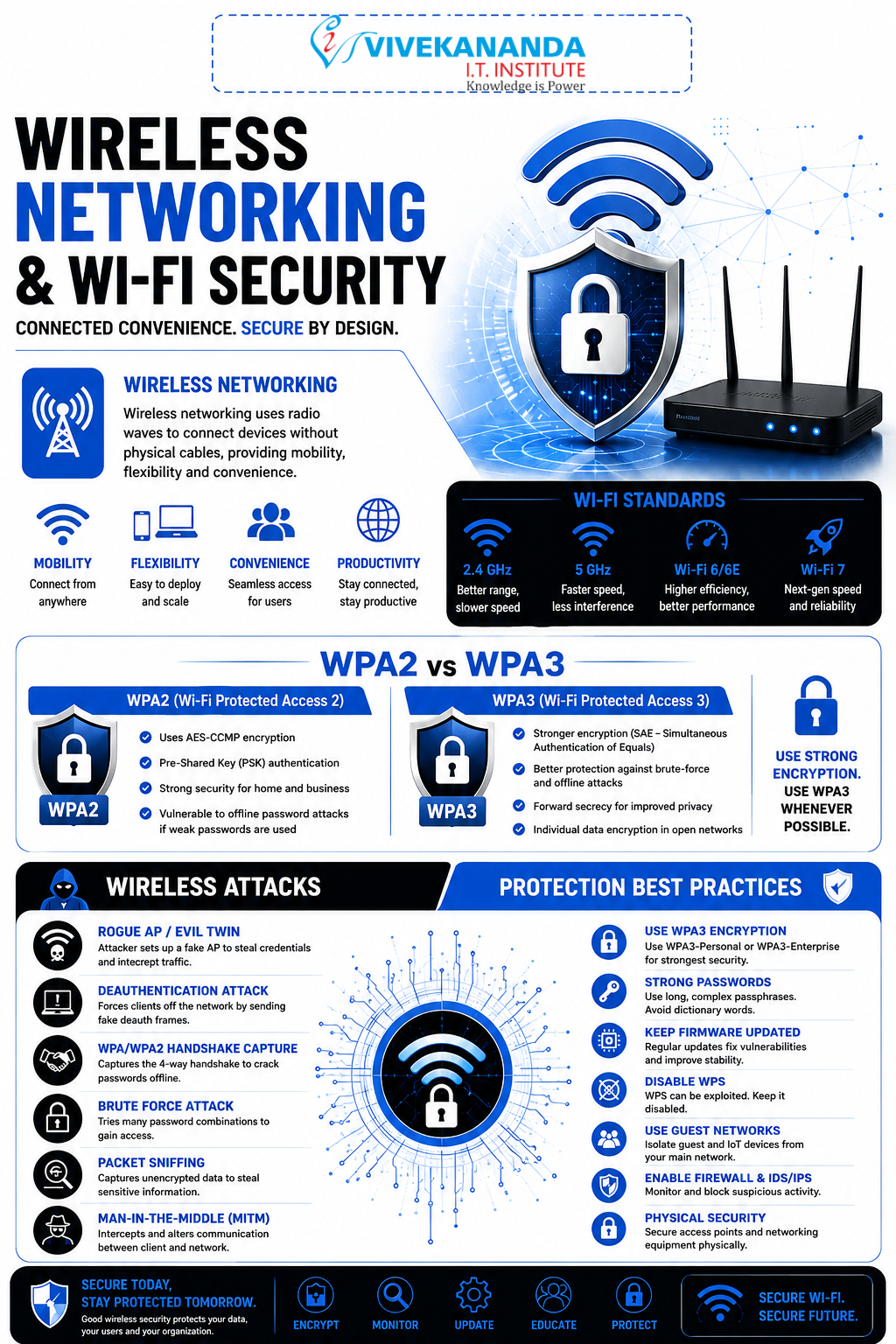
WPA2/WPA3, Wireless Attacks and Protection
Wireless Networking and Wi-Fi Security: Building Secure Wireless Connections
In today’s digital world, wireless networking has become the backbone of communication. From homes and offices to schools and smart cities, Wi-Fi technology keeps devices connected without cables. However, with convenience comes responsibility, wireless networks are also one of the most targeted areas in cybersecurity.
At Vivekananda IT Institute, students learn not only how wireless networking works but also how to secure networks against modern cyber threats effectively. In the fast-growing tech landscape of Vadodara, mastering Wi-Fi security is an essential skill for future IT and cybersecurity professionals.
What is Wireless Networking?
Wireless networking allows devices to communicate using radio waves instead of physical cables. The most common wireless technology is Wi-Fi, which enables internet access through wireless routers and access points.
Imagine a coffee shop where dozens of people connect their smartphones and laptops to the internet without plugging in a single wire. That is the power of wireless networking.
Common Wireless Network Components
1. Wireless Router
A device that connects the internet to wireless devices.
2. Access Point (AP)
Expands wireless coverage and allows multiple devices to connect.
3. Wireless Clients
Devices such as:
- Smartphones
- Laptops
- Tablets
- Smart TVs
- IoT devices
4. SSID (Service Set Identifier)
The visible name of a Wi-Fi network.
Examples
- Home Wi-Fi
- OfficeNet
- Vivekananda Lab
Understanding Wi-Fi Security
Wireless signals travel through the air, which means hackers can intercept them if proper security is not implemented.
Without security:
- Attackers can steal passwords
- Data can be intercepted
- Fake Wi-Fi networks can trap users
- Devices can be compromised
This is why Wi-Fi encryption protocols like WPA2 and WPA3 are extremely important.
Evolution of Wi-Fi Security Protocols
Wireless security has evolved over time to fight increasing cyber threats.
| Security Protocol | Status | Security Level |
|---|---|---|
| WEP | Obsolete | Very Weak |
| WPA | Old | Moderate |
| WPA2 | Widely Used | Strong |
| WPA3 | Latest Standard | Very Strong |
At Vivekananda IT Institute, students explore how these protocols evolved and why modern organizations are migrating toward WPA3 security standards.
WPA2 (Wi-Fi Protected Access 2)
WPA2 became the global standard for Wi-Fi security for many years.
Features of WPA2
AES Encryption
WPA2 uses AES (Advanced Encryption Standard), which provides strong encryption for wireless communication.
Authentication
Ensures only authorized users can join the network.
Data Protection
Protects sensitive information from hackers.
Types of WPA2
WPA2-Personal
Used in homes and small offices.
- Requires a shared password
- Easy to configure
WPA2-Enterprise
Used in companies and institutions.
- Uses authentication servers
- Provides advanced security control
- Suitable for large organizations
WPA3: The Future of Wireless Security
WPA3 is the latest wireless security protocol designed to overcome weaknesses found in WPA2.
Major Advantages of WPA3
Stronger Password Protection
Even weak passwords become harder to crack.
Individualized Data Encryption
Protects each device separately on public Wi-Fi networks.
Improved Security for Open Networks
Safer browsing in cafes, airports, and public places.
Protection Against Brute Force Attacks
WPA3 helps protect against repeated password-guessing attacks.
WPA2 vs WPA3
| Feature | WPA2 | WPA3 |
|---|---|---|
| Encryption | AES | Stronger AES-based security |
| Password Protection | Standard | Enhanced |
| Public Wi-Fi Security | Limited | Improved |
| Brute Force Protection | Weak | Strong |
| Modern Device Support | Good | Excellent |
At Vivekananda IT Institute, students gain hands-on experience configuring both WPA2 and WPA3 networks in cybersecurity labs.
Common Wireless Attacks
Cybercriminals often target wireless networks because many users neglect security settings.
Let’s explore some dangerous wireless attacks.
1. Evil Twin Attack
In this attack, hackers create a fake Wi-Fi network that looks identical to a legitimate one.
Example
- Original Wi-Fi: Office_WiFi
- Fake Wi-Fi: Office_WiFi_Free
When users connect:
- Hackers can monitor traffic
- Login credentials may be stolen
- Sensitive data can be intercepted
2. Wi-Fi Password Cracking
Attackers attempt to guess or crack Wi-Fi passwords using tools and wordlists.
Weak passwords such as:
- 12345678
- password123
- adminWiFi
can be cracked quickly.
3. Packet Sniffing
Hackers capture wireless data packets traveling through the air.
This may expose:
- Emails
- Passwords
- Banking details
- Chat messages
4. Deauthentication Attack
Attackers force devices to disconnect from Wi-Fi networks.
Purpose
- Disrupt network access
- Capture reconnection handshakes
- Launch further attacks
5. Rogue Access Point
An unauthorized access point installed inside a network.
This creates hidden entry points for attackers.
Wireless Protection Techniques
Strong wireless security requires multiple layers of protection.
1. Use WPA3 or WPA2 Encryption
Always enable:
- WPA3 whenever available
- WPA2 if WPA3 is unsupported
Avoid outdated WEP security.
2. Create Strong Passwords
A secure Wi-Fi password should include:
- Uppercase letters
- Lowercase letters
- Numbers
- Symbols
Example
V!vek@2026SecureNet#3. Disable WPS
WPS (Wi-Fi Protected Setup) can be vulnerable to attacks. Disabling it improves security.
4. Change Default Router Credentials
Never keep:
- admin/admin
- admin/password
Hackers often try default usernames and passwords first.
5. Use MAC Address Filtering
MAC address filtering allows only approved devices to connect. Although it is not perfect, it adds another layer of security.
6. Update Router Firmware
Manufacturers regularly release updates to fix vulnerabilities.
Updated firmware helps protect against:
- Malware
- Exploits
- Unauthorized access
7. Monitor Connected Devices
Check your network regularly for unknown devices.
Suspicious devices may indicate:
- Unauthorized access
- Hacking attempts
- Insider threats
Wireless Security in Cybersecurity Careers
Wireless security professionals are in high demand because organizations depend heavily on Wi-Fi networks.
Career Roles Include
- Network Security Engineer
- Wireless Security Analyst
- Cybersecurity Consultant
- Ethical Hacker
- SOC Analyst
Students at Vivekananda IT Institute receive practical cybersecurity training that prepares them for real-world wireless security challenges.
Why Learn Wireless Networking in Vadodara?
The IT and cybersecurity sector in Vadodara is growing rapidly. Businesses, educational institutions, and startups require professionals who can secure wireless infrastructures against cyber threats.
Learning wireless networking helps students:
- Understand modern communication systems
- Protect networks from attacks
- Build cybersecurity careers
- Gain industry-relevant practical skills
At Vivekananda IT Institute, students experience practical lab-based learning that combines networking fundamentals with advanced cybersecurity techniques.
Conclusion
Wireless networking powers the modern digital world, but unsecured Wi-Fi networks can become easy targets for cybercriminals. Technologies like WPA2 and WPA3 play a crucial role in protecting data, users, and organizations from wireless attacks.
Understanding wireless threats such as Evil Twin attacks, packet sniffing, and password cracking is essential for anyone entering the cybersecurity field. By implementing strong security practices and learning advanced protection methods, students can become skilled cybersecurity professionals.
If you want to build expertise in wireless networking and Wi-Fi security, Vivekananda IT Institute offers practical training and industry-focused cybersecurity education designed for the future of digital security in Vadodara.